From time to time people ask how to post pictures so here is a quick answer.
First off, if anyone wants to see how someone does anything in their post, just hit the quote button and look at all the "code" that is between the [ and the ]
Pictures need to be stored some where on the internet. There are several free host or if you have a website, host it there. some free examples are Imageshack, Tinypic, photobucket. They are all free but all have different rules and restrictions. Read the terms of service and see which one meets your need. For the record I am VERY happy with Imageshack, others here are happy with Tinypic.
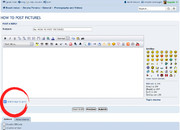
Pictures should look like this and the image button is at the red arrow:

The same principal works with any picture you see on the internet. Move you mouse over the image, right click, select properties. Then all you have to do is cut and past the link, highlight the link and hit the image button. like this, I will post the eomahaforums banner....